How to Compare Lease Agreements and Review a Lease Redline
To compare lease agreements, run a word-level comparison of the two drafts so every insertion and deletion is marked and numbered. Then walk that redline clause by clause, starting with the terms that cost the most money: rent, operating expenses, improvements, assignment and renewal. Finish by checking the exhibits, riders and rent schedules against the body text, and by confirming that the copy you sign matches the last agreed draft.
This guide covers commercial and residential leases. It explains what usually changes between drafts, where changes hide, and a step-by-step method that works whether you are a tenant, a landlord, an operations lead or the lawyer on the file. It is general information, not legal advice. Landlord-tenant rules vary by state and city, so consult a qualified attorney about your specific lease.
Why lease comparisons differ from other contracts
A lease is not a typical services agreement. Several features make its drafts harder to compare:
- Long terms magnify small edits. A one-point change to an annual escalation compounds over every year of a multi-year term.
- The numbers live in several places. Rent appears in the body, in a rent schedule, and sometimes again in a rider. A change in one place may not be mirrored in the others.
- The first draft is usually the landlord's form. In commercial leasing the landlord typically starts from a template that favors the landlord, and negotiated changes arrive as edits to that form or as a separate rider.
- Riders and exhibits come from different people. The floor plan, work letter, building rules and guaranty may each be drafted by someone else and updated on a different schedule.
- Defined terms do heavy lifting. Words like "Rentable Area," "Operating Expenses" and "Commencement Date" drive the math in other sections.
If you review other agreements too, the approach overlaps with our guides to comparing NDA drafts and comparing SaaS MSA drafts. Leases simply carry more money in more places.
The clauses that change most between drafts
Rent and escalations
Check the base rent amount, the start date for rent (which may differ from the lease start date), any free-rent or abatement period, and how increases are calculated. Escalations can be fixed amounts, fixed percentages or tied to an index. Watch for a percentage that changes, an increase that moves from every other year to every year, or abatement that becomes conditional on the tenant not being in default.
Operating expenses and CAM
First identify the lease type. In a net lease the tenant pays base rent plus a share of building costs such as taxes, insurance and operating expenses. In a gross lease the tenant pays one rent amount. In a base-year modified gross lease, common in office space, the tenant pays only the increase in expenses above the first lease year. A draft that quietly shifts from one structure to another changes the economics of the whole deal.
Then read the details:
- The definition of Operating Expenses and its list of exclusions.
- Any cap, and whether it is noncumulative (each year stands alone, which tenants prefer) or cumulative and compounding (unused increases carry forward, which landlords prefer).
- What counts as controllable. Tenants often ask that everything except taxes, insurance, utilities and sometimes snow removal sit under the cap. Landlords push for a broader "uncontrollable" category.
- The reconciliation and audit clause, including how long you have to dispute the annual statement.
Tenant improvement allowance
Look at the dollar amount, whether it is stated per square foot or as a lump sum, what it can be spent on, the deadline to use it, how and when it is paid out, and whether unused funds can be applied to rent. Check the work letter exhibit as well as the body, since the allowance terms often sit in both.
Assignment and subletting
Standard form language requires landlord consent to any transfer. It may define "transfer" broadly enough to cover a change of control, a sale of a majority of the tenant's stock, or a transfer by operation of law. Tenant-side edits usually add a standard that consent will not be unreasonably withheld, conditioned or delayed, and carve out permitted transfers such as a merger, a sale of substantially all assets, or a franchisee. In each new draft, confirm those protections are still present in full.
Renewal options
Check the number and length of renewal terms, the notice window to exercise the option, and how renewal rent is set. If renewal rent is "fair market value," look for how that value is determined and what happens if the parties disagree. A narrowed notice window is easy to miss and expensive to blow.
Exhibits, riders and financial schedules
This is where redlines most often fail. A rider can override the body of the lease, and many leases say the rider controls in a conflict. A rent schedule can change by a single figure in a single row.
Two practical points:
- Compare each exhibit, not just the body. If exhibits arrive as separate files, run a separate comparison for each one. If an exhibit was replaced entirely, read the new one start to finish.
- Check the numbers manually. A text comparison, including ours, compares words. It does not understand table structure, so a changed figure in a schedule shows up as a changed word without telling you which month or year it belongs to. Recalculate the schedule from the body's rent and escalation terms, and confirm that every figure in the body, the schedule and any rider agrees.
Residential lease specifics
Residential leases are shorter, but the same discipline applies. Focus on:
- Security deposit: amount, where it is held, what can be deducted and when it is returned. Limits and return rules vary by state and city.
- Fees: late fees, pet fees, application or administrative fees, parking, amenity and utility charges. A new fee line is easy to skim past.
- Renewal: whether the lease converts to month-to-month, renews automatically or simply ends, and how much notice either side must give. Notice requirements vary by jurisdiction.
- Rent increases on renewal, early termination terms, and who handles repairs and maintenance.
- House rules on guests, pets, subletting and alterations, which may sit in an addendum rather than the main lease.
Because so many residential rules depend on local law, ask a local attorney or tenant resource what applies where you live.
Commonly missed changes in lease redlines
Most missed changes are small words with large effects:
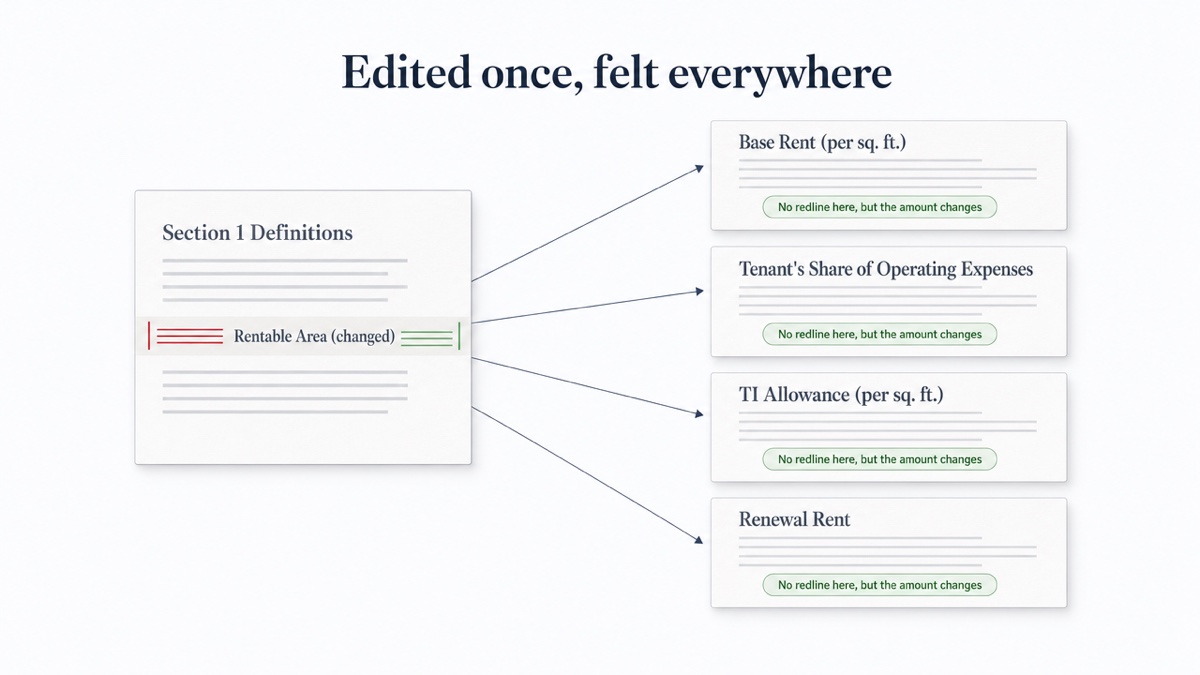
- A changed definition. If only the definition of "Rentable Area" or "Commencement Date" is redlined, every clause that uses the term changes too, though the redline marks just one spot.
- "Shall" becomes "may," or "reasonable" disappears from a consent standard.
- "Unreasonably withheld, conditioned or delayed" loses a word, leaving only "unreasonably withheld."
- A cap switches from noncumulative to cumulative.
- Cross-references that no longer point to the right section after renumbering.
- Notice addresses, cure periods and holdover rent.
- Guaranty changes, including a limited guaranty becoming unlimited.
- A promise made orally or in email that never made it into the draft. The written lease governs, so anything agreed must appear in it.
Step by step: how to compare two lease drafts
- Gather the right versions. Get the previous draft, the new draft, every exhibit and rider, and the term sheet or letter of intent. Ask for editable Word files where possible.
- Run the comparison. In DocxDiff, add the earlier draft as the original and the new one as the revised. Word, Markdown and text files and pasted text are free; PDF comparison is a Pro feature. Turn on ignore-whitespace so spacing edits don't clutter the view.
- Work through the numbered changes in order of cost. Rent, expenses, TI, assignment and renewal first. Use j/k to jump between changes and the focus filters to show only deletions, where protections tend to vanish.
- Search for every changed defined term. For each one, find every section that uses it and reread those sections.
- Check the draft against the term sheet. The lease will contain far more than the term sheet, but every agreed business term should appear and match.
- Compare exhibits and riders separately, then recalculate the rent schedule by hand.
- Record questions by change number. "Change 23 removes the reasonableness standard" is faster to resolve than "somewhere in Article 12."
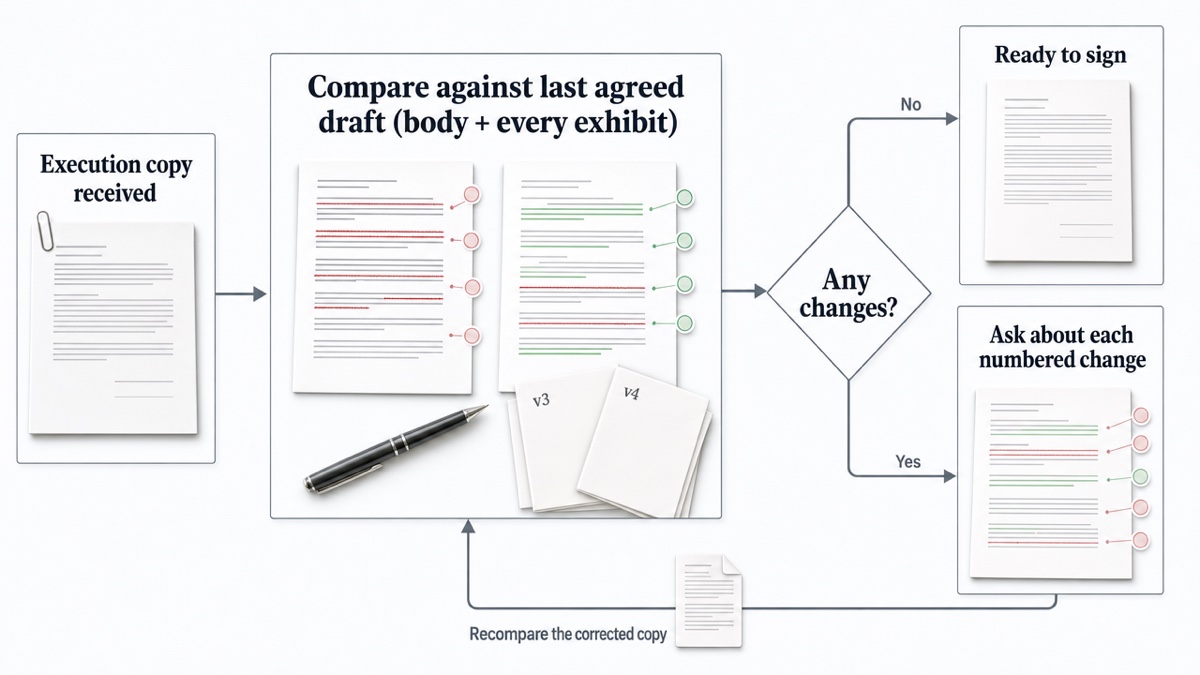
- Compare the execution copy before signing. Run the signature version against the last agreed draft, exhibits included. A clean copy should produce no changes; anything that appears needs an explanation.
Once you are done, export an HTML or Markdown report to share with your team, or sign in to save the comparison and reopen it later. Skip saving if the documents must never be stored anywhere.
The same method works for other negotiated documents; see our guide to comparing settlement agreement drafts.
Ready to check your lease? Drop both drafts into DocxDiff and get a numbered redline in seconds, free and with no account required.
Frequently asked questions
Can I compare a lease if the landlord only sent a PDF?
Yes, with Pro. PDF comparison, including page view and moved-text detection, is part of the $12/month Pro plan, and scanned PDFs can be read with OCR you approve. On the free plan, ask for a Word version or paste the text in.
Does DocxDiff tell me whether a lease change is good or bad?
No. It shows exactly what changed, numbered so you can cite each edit. Deciding what a change means for you is your call or your attorney's.
Will the comparison catch changes inside rent tables?
It compares the text, so a changed figure will appear as a changed word. It does not read table structure, so always recalculate rent schedules and cross-check them against the body.
Is it safe to compare a confidential lease?
The comparison runs in your browser and the files are not uploaded unless you sign in and save the comparison, or approve cloud OCR for a scanned PDF on Pro.
Does it show formatting changes like bold or font edits?
No. DocxDiff compares text at the word level. That is where the substantive changes in a lease live, but formatting-only edits will not appear.