A Litera Compare alternative for small firms and solo lawyers
If you mainly need to see what changed between two drafts, a lighter Litera Compare alternative can replace an enterprise suite. DocxDiff gives you a numbered word-level redline for free, with Pro at $12/month for PDF comparison. Litera Compare is still the stronger fit if your firm relies on document management system (DMS) integration, Outlook workflows, bulk comparison or firm-wide IT deployment.
The real question is which of those features you use every week. This guide covers what enterprise suites include, how their pricing usually works, what to ask a sales team, and how to test a switch on drafts you have already negotiated.
What enterprise comparison suites typically include
Litera Compare is built for large firms. Litera says on its website that the product is used by 99% of the AmLaw 100, though some of its materials give 97%.. Suites in this category usually offer the following:
- Deep change detection. Dedicated legal engines generally claim to catch text, font and styling changes, plus layout, headers and footers, footnotes, numbering, tables, images, text boxes and hidden text.
- Many output formats. These include Word with tracked changes, a PDF redline, changed-pages-only PDFs, side-by-side views and a table of changes.
- Integrations. Enterprise tools commonly connect to iManage, NetDocuments, SharePoint and Worldox, and they run inside Word and Outlook.
- Several deployment models. Litera describes Compare Server as a web service that performs server-side comparison and exposes APIs for other applications. Ask Litera how it is licensed.. Litera also offers cloud and browser-based access and keeps desktop versions available..
- Newer features. These include email thread comparison in Outlook, bulk comparison and AI-generated redline summaries. Litera describes desktop, cloud and server-based options..
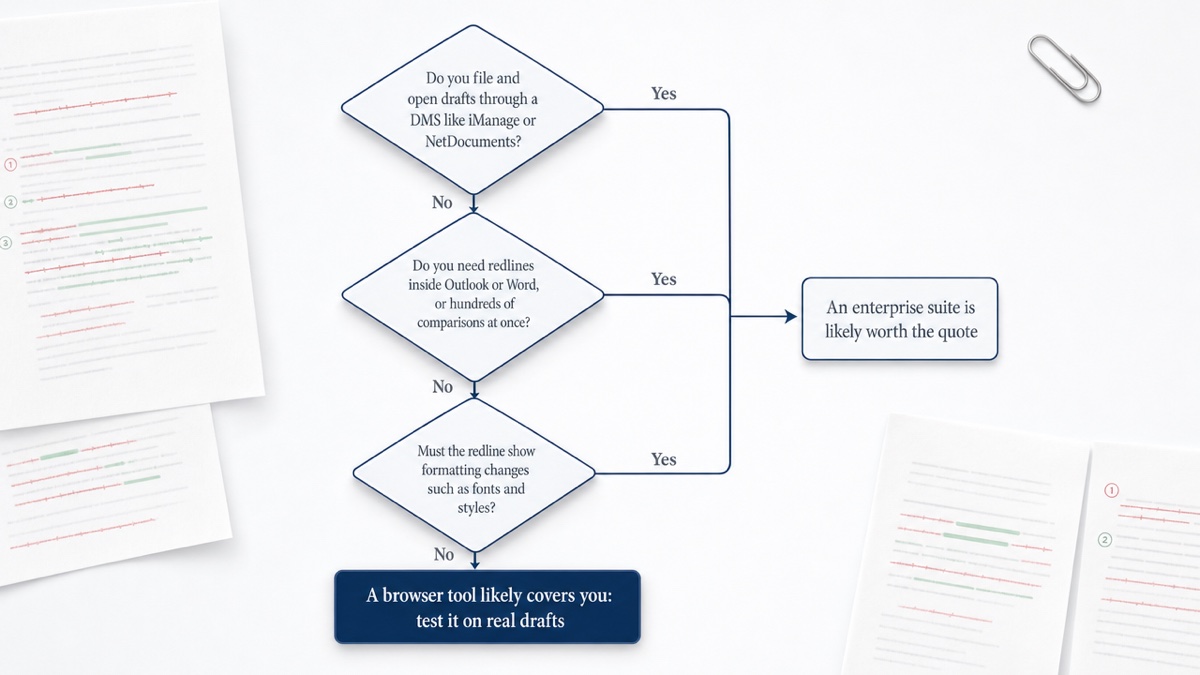
For a firm with a DMS, an IT team and hundreds of users, those integrations save real time. A three-lawyer practice that compares a handful of contract turns a week may use very little of that list.
Quote-based vs transparent pricing
Enterprise legal software is usually sold through a sales team. Litera does not appear to publish prices for Litera Compare, so buyers, including solo and small firms, should expect to contact Litera's sales team for a quote.. We don't quote figures here because any number we gave you would be a guess. Your quote will depend on seat count, modules, deployment and contract term.
Quote-based pricing is not a trick. It reflects deals that differ from firm to firm. It does mean you cannot compare costs until you have been through the sales process.
Transparent, self-serve pricing works the other way: you see the price, sign up and cancel when you like. DocxDiff's core tool is free with no account required. Pro is $12/month and you cancel from your account menu.
Costs beyond the license
Licensing is only part of the total cost of an enterprise suite. Budget time for these as well:
- IT deployment and updates across machines
- DMS configuration and testing
- Staff training
- Contract terms such as minimum seats, annual commitments and auto-renewal windows
A self-serve browser tool has almost none of this overhead. It also has none of the integrations that justify it.
Questions to ask a sales team
If you are getting a quote, ask these so you can compare offers fairly:
- Is there a minimum seat count, and can we add or drop seats mid-term?
- Is the term annual or multi-year, and does it auto-renew?
- How much notice is required to cancel, and what happens to our data if we do?
- Which modules are in this price, and which features cost extra?
- Does DMS integration require setup by your team or ours, and is that billed?
- Is there an offline or desktop option, and where are documents processed in the cloud version?
- What security certifications can you document? Vendors commonly cite ISO 27001, SOC 2 and GDPR compliance.
- How have renewal prices changed for existing customers?
Side-by-side needs table
| Need | Enterprise suite (e.g. Litera Compare) | DocxDiff |
|---|---|---|
| DMS integration (iManage, NetDocuments) | Core strength | Not offered. You compare files from your computer or paste text. |
| Outlook and email thread redlining | Outlook integration offered; confirm email thread comparison with the vendor | Not offered |
| Bulk comparison of many pairs | Offered (bulk redlining via Litera's Office and Dragons product) | Batch comparison listed as coming soon on Pro |
| Word output with tracked changes | Offered (redlines you can accept or reject) | Reports are PDF, HTML and Markdown |
| Formatting changes (bold, fonts, styles) | Typically detected; confirm with the vendor | Not compared. Text only, at the word level. |
| Core word-level redline of .docx | Yes | Yes, free |
| Numbered changes you can cite | Varies by output | Every change numbered, free |
| PDF comparison and moved text | PDF comparison yes; confirm moved-text detection with the vendor | Pro, $12/month |
| Scanned-PDF OCR | Yes | Pro, with explicit approval each time |
| Self-serve signup and published price | No published price found; contact sales | Free, or $12/month |
If you need anything in the first five rows, an enterprise suite is probably worth it. If your needs live in the bottom half, a browser tool may cover them. We compare other options in our guide to legal document comparison software. If you are moving off an older tool, see the Workshare Compare alternative guide.
Privacy: in-browser vs cloud upload vs desktop
Where your documents are processed matters for client confidentiality. There are three common models:
- Desktop software runs comparisons on your computer, so documents need not leave it. It can also work offline.
- Cloud tools upload your files to the vendor's servers and rely on encryption in transit and at rest. Cloud platforms need an internet connection.
- In-browser tools process files on your device inside the browser, with no installation.
DocxDiff uses the in-browser model. Text extraction and comparison happen on your machine. A document leaves your device only in two cases: you sign in and save a comparison, which stores both source files, or you approve cloud OCR for a scanned PDF on Pro. If a matter must never be stored anywhere, stay signed out or skip saving.
Lawyers generally have a duty to take reasonable steps to protect client information, including when they use third-party technology.. This page is general information, not legal or ethics advice. Check your jurisdiction's rules or a qualified ethics advisor.
What DocxDiff does, and what it doesn't
On the free plan:
- Unlimited word-level comparisons of Word, Markdown and text files, or pasted text
- Insertions in green and deletions struck through in red
- Every change numbered, so you can say "see change 14" to opposing counsel
- Redline and side-by-side views
- Focus filters, ignore-capitalization and whitespace options, and j/k navigation between changes
- HTML and Markdown reports
- Saved history with a free account
Pro ($12/month) adds:
- PDF comparison with page-accurate redlines and moved-text detection
- Page view
- Scanned-PDF OCR
- Page-faithful and annotated PDF exports
- Custom branding on reports
- Shared comparisons for your team or clients
The limits are just as clear. DocxDiff compares text, not formatting, tracked-change metadata or comments. It has no DMS or Outlook integration. It doesn't review clauses or suggest edits. It shows what changed, and you decide what it means.
Its main advantage over Track Changes is that it works after the fact. It can compare a "clean" copy someone sent you against your last draft, and it needs no Word license.
For broader workflow advice, see document comparison for small law firms.
How to trial a switch on real drafts
Don't decide based on a vendor demo. Test with documents where you already know the answer.
- Pick five past drafts. Include one with a moved clause, one with renumbered sections, one with tables, one with footnotes and one "clean" final you had to verify.
- Write down the known changes from memory or from the old redline before you run anything.
- Run each pair through both tools. Count missed changes and false alarms. Note where renumbering or a moved clause creates noise.
- Check the output against what recipients expect. If opposing counsel or clients want a Word file with tracked changes, a PDF or HTML report may not suit them. Ask before you switch.
- Time a full review. Include filtering, navigating and exporting, because speed on a 40-page agreement matters more than a feature list.
- Run both tools in parallel for a month before you let a renewal lapse. Keep the old tool for edge cases if your contract allows it.
You can start a trial at https://docxdiff.app without an account. Drop in two versions of a past contract and compare the result with your current redline.
Frequently asked questions
Does DocxDiff integrate with iManage or NetDocuments?
No. You compare files saved on your computer or pasted text. If your firm's workflow depends on opening and saving drafts through a DMS, an enterprise suite is the better choice.
How much does Litera Compare cost?
At the time of writing, Litera does not appear to publish prices, so expect to request a quote from its sales team.. Ask about seat minimums, term length and renewal terms along with the headline price.
Can DocxDiff produce a Word document with tracked changes?
No. It exports reports as PDF, HTML and Markdown. If a counterparty insists on tracked-changes Word files, keep Word's built-in compare for that step: open Word, go to Review > Compare > Compare, then choose the original and revised documents.
Will it catch formatting changes?
No. DocxDiff compares text at the word level. A change to bold, a font or a style won't appear in the redline. A change to the wording will.
Is the free plan enough for a solo practice?
For Word and text drafts, often yes. The free plan offers unlimited comparisons with numbered changes and HTML and Markdown reports. PDF comparison, scanned-PDF OCR and branded reports require Pro.
Is it safe for privileged documents?
The comparison runs in your browser, so signed-out comparisons never reach a server. Saving a comparison stores the source files in your account, so skip saving for anything that must stay only on your machine.